Networking Path Series
Networking Path Series — Computer Network, IP, and MAC address.
Welcome to your first lesson in computer networking fundamentals.
Learning Objectives:
- What is a network
- What is an IP address
- What is a MAC address
Networks are just a bunch of connected things; common interests and likes connect your social network, the city transportation system can also be considered a network, and the post office system is another example of a network.
Enough with analogies; the technical definition for a network is a digital telecommunication network that allows nodes to share resources. Nodes could be anything, from your computer, mobile phone, the server you connect to, or your WiFi; a network is always made of two ends, clients and servers.
A client is a device that accesses a service made available by a server.
A server is a device that provides functions or services for clients.
So the internet is just a giant network that is made of everyone’s nodes, one big network carrying everyone on board. The first version of the internet was built in the 1960s through the ARPANET project, which was funded by the United States Department of Defense. That was the first documented network in action, but the internet we know today was invented in 1989, then the World Wide Web (www) was invented by Tim Berners-Lee.
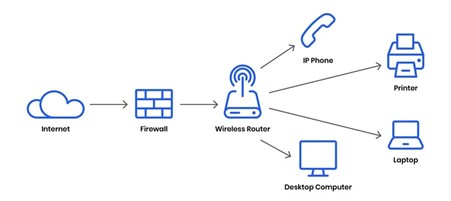
Devices that will need to communicate over the internet will need two things: a name and a fingerprint. The digital device’s name and fingerprint are known as:
• IP address
• MAC address
Names are changeable (it’s a one hell of a process for anyone to change their names, but yes, it’s doable), but our fingerprints aren’t changeable; the equivalent of a device name is the device IP address. Even MAC addresses are changeable, but that’s for another day.
IP address (Internet Protocol) is how we identify a node that’s connected to a network. These IPs can be associated with other nodes at different times. An example of an IP can be (127.0.0.1). It’s a set of numbers that is divided into four octets. IP addresses can never be active more than once in the same network.
They follow a set of protocols and standards; this is how we ensure that all the devices in the same network speak the same language. There are two types of networks, depending on their reachability:
• Public Network
• Private Network
A public network can be accessed via its public IP. A private network also has an IP, but let’s leave this also for another day cause it requires more depth in other topics.
But what does it mean for an IP to be public or private?
A public IP address is used to identify the device on the Internet; a private IP address is used to identify the device among other devices in a private network.
A very easy way to distinguish if the IP address is public or private is the first octet, if the first octet is 192 then that’s probably a private IP address, but this is just for the IPv4, there is also IPv6, IPv4 is a problem nowadays because it only support 2^32 (4.29 billion devices) and they are a lot more than just that nowadays, we ran into an IP shortage this is why they invented IPv6, and if you are wondering why not IPv5 well it was just an experimental protocol.
IPv6 can support up to 2^128 (340 trillion plus devices), fixing our IP shortage issue.
MAC addresses:
Any device on a network will have a microchip as a physical interface called NIC (network interface card), this physical interface will be assigned a unique address at the factory it was built, this interface is called MAC address (media access control) which are twelve characters hexadecimal number and each two values will be separated by a colon, will be divided into two parts, the first six character will represent the company that made this network interface and the other six characters are this interface unique number, let’s take for an example
75:c8:2b:a9:c6:ab
-75:c8:2b is the manufacturer’s unique identifier.
-A9:c6:ab is this interface’s unique identifier.